The ultimate webinar checklist
04.05.2020

If there is anyone who won on the current lockdown, it’s Zoom (and other webinar software companies) stakeholders. Webinars became a way to communicate with clients, to create a sense of community and to mimic the everyday life we all have been deprived of. If you haven’t done your own webinar yet, here is your ultimate checklist, that will take you through the whole (pretty complex) process, step-by-step.
Webinars across industries
Not all webinars are created equal. Some topics gather a broader audience, some other – a small group of specialists. We have prepared a handy infographic that will help you determine how many participants is enough, when to invite your audience and when to send the invitations.
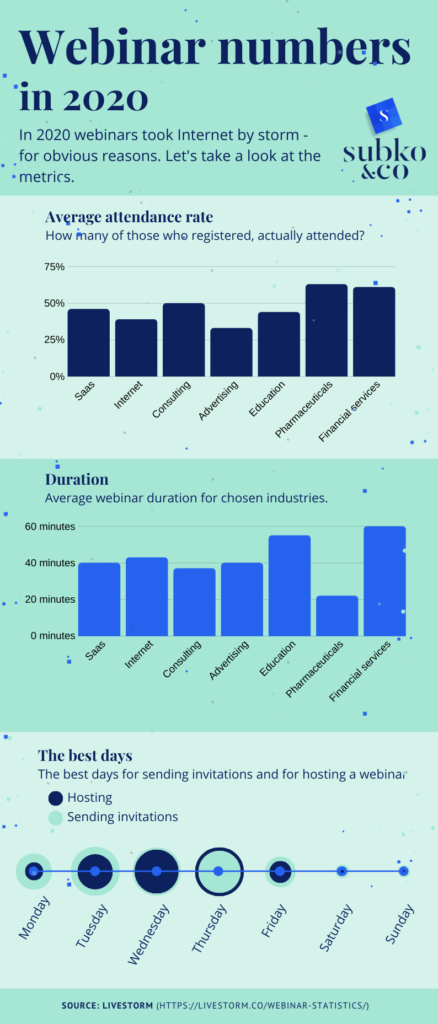
Your ultimate webinar checklist:
3 weeks before the webinar:
- Prepare the outline
- Answer the questions: who is my webinar for and how will my audience benefit from what they learn. Is this knowledge useful for them?
- Answer the technical questions:
- Will your participants need to register for the webinar? (If yes, and if you are from the EU – do you have a GDPR policy?)
- Will you present by yourself or will you have a co-host?
- When is your audience the most likely to attend? Some say that it’s between 11 am and 2 pm, but it really all depends. Make sure you understand the habits of your audience – if you are going to talk to a culturally diverse group, some of them may be at work, some of them may have lunch and others – a siesta.
- Think about how you are going to reach your audience. Remember that only 30-40% people who register for the webinar actually participate in it. If the sign-in rate is 10% (and that’s optimistic) only 3-4% of the people who get the message actually attend your webinar. What you can do?
- Run ads on social media
- Share the link on your social media channels and in groups
- Ask your friends and business partners to share the link
- Add your online event to the popular event platforms, like Eventbrite or MeetUp.
- Do some e-mail marketing
- Each of the promotional activities will need different copy and materials – make a list and create banners and text you are going to share with your audience .
- Think about the length of your webinar. Usually they are between 30 and 60 minutes long.
- Choose a webinar platform (there are plenty to choose from: Demio, WebinarNinja, Zoom to name just a few).
2 weeks before the webinar:
- Launch the promotion and
- Find a wingman (or wingwoman). This person will take care of the audience and act as a moderator, answering ongoing questions, so he or she needs to have some knowledge on the topic. Having a wingman who handles the questions from the audience lets you focus on what you want to say. This person will also observe the webinar, so that when something happens, for example your connection breaks or you have a wardrobe malfunction, he or she will quickly let you know.
- Create a detailed plan of what you are going to talk about and do a rehearsal with your wingman as an audience. Make sure you record the webinar.
7 days before the webinar:
- Find a place where you are going to run the webinar – nice, plain background and good light. Make sure there will be no disruption, like a sudden renovation crew drilling the wall in the neighboring office.
5-1 days before the webinar:
- Agree on a communication channel with your wingman – preferably a mobile app, so that the message is not seen when you are sharing the screen with your audience.
- Prepare your webinar space – if you are going to share your screen, remember to put all the files you’ll need into a separate folder, otherwise the audience may be able to see files that they are not supposed to see. The same applies to the desktop – a digital post-it with “Tuesday – Call mom” will not look professional.
- Prepare and print your notes
- Angle matters. Find a way to put the camera on the level of your forehead, everyone looks bad from the low camera angle – you can either use one attached to your monitor or you can put your laptop on an empty shoe box
- Send a reminder to those, who registered and a another one to those who might have missed your first message (this applies mostly to email marketing, but you may want to try to re-post the information on social media)
- Make sure you can use your computer with the ethernet (the “wired” Internet) – it’s the most reliable connection. If you can’t use it, get a spare source of Internet, such as a mobile hotspot. Test it before the webinar!
On the day of webinar:
- Send another reminder – so that those who registered don’t miss the webinar.
- Bring a standing mirror with you, so that you can control the way you look
- Bring a face powder and concealer
- Get a glass of water
- Get a charger. This is really basic, but people tend to overlook basic issues when they focus on the complex ones.
- Speak slowly – we all tend to speak fast when we are excited, but slowing down buys you extra time to think on what you are saying
- Remember: your audience is here to learn something from you and you are talking from the standpoint of an authority. They are not here to judge you, most of them are genuinely interested. I’m not saying “do not panic”. Everybody experiences stage-fright, but remember – these people have a kind attitude towards you.
A day after the webinar:
- Send a thank-you email to those who participated. You can ask them to evaluate your webinar and tell you what other topics they would like you to cover in the next one.
Good luck!